
How to Scrape Shopify Stores: Catalog, Product, and Price Data
Shopify powers millions of storefronts, and because every one of them runs on the same platform, they share a data layer that is unusually consistent and, in most cases, openly accessible. If you sell against Shopify brands, source from them, or track a category, that catalog is a rich source of pricing, assortment, and stock signals. This guide covers what data actually lives on a Shopify product page, the practical challenges specific to Shopify stores, how to capture it on a schedule, and an honest look at building it yourself versus having it delivered.
What data actually lives on a Shopify product page
Because every Shopify storefront is built on the same platform, the data layer is remarkably consistent from store to store, and that is what makes Shopify one of the friendlier catalogs to work with, at least at first.
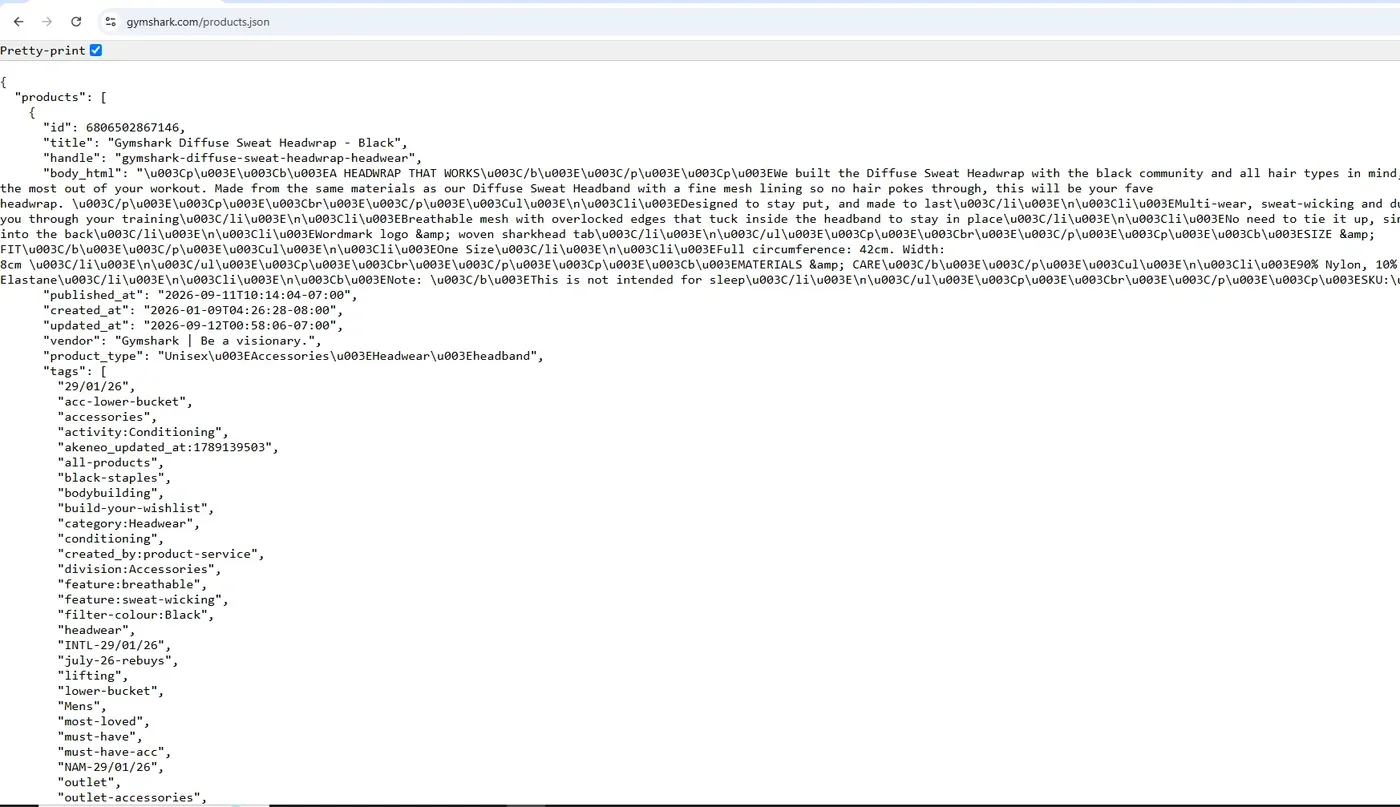
The most useful entry point is the public JSON that most stores expose. Append /products.json to a store's root domain and you get a paginated feed of products, each with its variants, options, images, tags, vendor, product type, handle, and timestamps. A single product is available at /products/{handle}.json, and a whole collection at /collections/{handle}/products.json. These endpoints return structured JSON with no HTML parsing required, which is a real advantage.
The rendered product page carries even more. Inside the script tag of type application/ld+json you will usually find the Product schema, which includes offers, price, currency, and availability, and sometimes a GTIN or SKU. Most themes also embed a JavaScript product object with variant level detail that mirrors the JSON feed.
The one thing the public JSON does not give you cleanly is stock quantity. The available field is a true or false flag per variant, not a number. To turn that into an actual count, you probe the cart AJAX API, request a large quantity of a variant, and read the response, which caps the amount and tells you how many were really available. That is how a simple yes or no becomes a restock and low stock signal.
The challenges specific to Shopify stores
Shopify looks easy until you run it at scale across many stores, and then the edge cases pile up.
Pagination and the 250 ceiling. The /products.json feed returns at most 250 products per page, so you page through with limit=250 and an incrementing page or since_id parameter. Miss the pagination and you silently capture only the first slice of a large catalog. A single product is also capped at 250 variants, so very large configurable products get truncated.
Stores that lock it down. The JSON feed is on by default, but plenty of larger or security conscious merchants disable it, password protect the store, or sit behind a bot management layer that blocks automated requests. When that happens you fall back to the sitemap and the rendered pages, which is slower and needs more care.
Available is not quantity. The standard feed tells you whether a variant is buyable, not how many are left. If you want real restock timing or low stock alerts, you have to recover the number through the cart, and you have to do it gently so you do not hammer the store.
Multi currency and Shopify Markets. A growing share of stores serve different prices and currencies by shopper location. The base feed shows the shop's primary currency, so if you care about what a customer in a specific country actually sees, you have to account for the store's Markets configuration rather than trusting one feed.
Sale detection. The current price lives in the price field, and the pre discount price lives in compare_at_price. A discount is the gap between the two. If you only capture price you cannot tell a permanent price from a promotion, and you cannot catch MAP violations.
Variant sprawl and theme differences. Color, size, and bundle options multiply into hundreds of variants, and matching them across scrapes so you can compare yesterday to today is where most homemade scripts get messy. Themes also differ in how they embed data, so a parser tuned to one store can quietly break on the next.
Skip the build, get the feed
Send us your Shopify stores target and we will scrape a real sample and send it back, no signup.
Get a free sampleHow to capture it on a schedule
A one time pull is easy. The value is in a clean feed that stays correct as the store changes, and that is a different problem.
Discover first. Read the store's /sitemap.xml, which fans out into product and collection sitemaps, so you get a complete, authoritative list of URLs instead of guessing handles. That same list is your early warning for new products and delistings.
Pick a cadence that matches the signal. Price and stock move far faster than descriptions and images. For competitive pricing and restock alerts, a tight cycle matters. We monitor around 3,000 Myntra products on a 10 minute cycle with instant restock and price drop alerts, and the same pattern maps cleanly onto Shopify catalogs, so you run frequent checks on the fields that change and slower full crawls for the rest.
Diff, do not just dump. Store each capture with variant level keys so you can compare runs and emit events, price changed, went out of stock, came back, new variant added, compare_at_price appeared. Those events are what feed alerts and dashboards, and they are far more useful than a nightly export of everything.
Stay polite and resilient. Sensible request pacing, concurrency limits, and retry logic keep you from getting throttled or blocked, and they keep the store owner from noticing you at all. When a store swaps themes or turns off an endpoint, the pipeline has to detect the break and adapt rather than silently returning stale or empty data.
Build it yourself or have it delivered
You can absolutely build this yourself. For a handful of stores that leave /products.json open, a weekend script and a scheduled job will get you a usable feed, and that is a fair place to start.
The cost shows up later. Pagination bugs, the 250 variant cap, stores that disable the JSON, the cart probe for real stock, Shopify Markets pricing, variant matching across runs, and the steady drip of maintenance as themes change and endpoints move. Each one is small on its own. Together they turn a weekend project into something a person has to own every week.
That is what we do at DataScrape. We are a done for you monitoring service, you work directly with the founder rather than a ticket queue, and we specialize in the hard sites where cheap self serve APIs quietly break. We run Booking.com and Expedia through heavy anti bot, and we built a pipeline pulling foreclosure data from all 159 Georgia county portals, so a fleet of Shopify stores with mixed defenses is well within scope. You tell us the stores and the fields you care about, and we deliver clean, structured catalog, price, and stock data on your schedule, then maintain it as those stores change. We do not sell proxies or a self serve tool, we hand you the finished feed.
Knowing the numbers are actually right
Scraping Shopify is easy to start and easy to get quietly wrong, and a wrong feed is worse than no feed because you act on it. The first defense is cross checking your sources. A Shopify store exposes the same product three ways, the /products.json feed, the JSON-LD in the page, and the theme's JavaScript product object, and they do not always agree. The JSON feed is served from a CDN and can lag the live page by minutes or longer, so a price you pull from it may already be stale. When price accuracy matters, confirm the feed against what the rendered page shows.
Then validate the fields themselves. compare_at_price should sit above price, so a discount where the two are equal, null, or somehow inverted is a data error, not a deal. A price with no currency attached is meaningless once a store runs Shopify Markets, so every row needs its currency stamped and checked. The cart recovered stock number is an estimate that a per order purchase limit can cap, so treat a sudden low stock reading with suspicion rather than alerting on it blindly.
The failure that hurts most is silent breakage, a scraper that keeps returning tidy but empty or frozen data after a theme swap or a disabled endpoint. You catch it with tripwires, expected row counts within a band, non null rates per field, price distribution checks, and an alert when a catalog appears to shrink overnight. Building and watching those checks is most of the real work, and it is exactly what we run and maintain for you.
Staying on the right side of public data
Shopify catalog and price data is about as clean as public data gets. A storefront's /products.json feed is the store publishing its own catalog to the open web, the same information any shopper sees on the page, and price, title, variant, and availability are commercial facts about products, not personal information about people. That keeps you well clear of the data protection rules that make scraping people's profiles fraught. The one place personal data creeps in is reviews, which can carry a reviewer's name, so if you do not need review text, leave it out and the question disappears.
The line that matters is public versus gated. Collect only what a logged out visitor can reach, and respect the signals a store sends. When a merchant password protects the store or deliberately turns off the JSON feed, that is a clear do not automate signal, and forcing past it moves you from reading public data to circumventing a control. Honor the store's robots directives and keep your request pacing gentle so you never degrade the site for real customers, which is good manners and good risk management at the same time.
This is the same principle we hold on every project. We collect only public data, we do not sell proxies, and we hand you the finished feed. If you want Shopify catalog and price data gathered cleanly and defensibly, without your team having to reason through any of this each time a store changes, that is the service we run.
Step by step: reading a Shopify store's public catalog
Shopify is the friendly case. Every Shopify store exposes its catalog on a public JSON endpoint, /products.json, that a normal browser can read with no API key and no login. So pulling a store's products is a few lines of Python, or one command with the free tool we open-sourced for exactly this.
import requests

domain = "gymshark.com"
url = f"https://{domain}/products.json?limit=250&page=1"
products = requests.get(url, headers={"User-Agent": "Mozilla/5.0"}).json()["products"]

for p in products[:3]:
    for v in p["variants"]:
print(p["title"], v["sku"], v["price"], "available:", v["available"])| Product | Variant | SKU | Price | Available |
|---|---|---|---|---|
| Speed Shorts | Black / M | SS-BLK-M | 40.00 | true |
Example of the cleaned output for one product.
Prefer not to write any of this? We open-sourced a Shopify scraper that does the whole job in one command. It resolves any store URL to its underlying Shopify domain, paginates the full catalog, and pulls variants, prices, SKUs, stock, and images, then exports to CSV or JSON. MIT licensed, no API key, no paid tier.
python shopify_scraper.py gymshark.comReading a catalog once is the easy part, and Shopify makes it easy on purpose. The value is in what comes next: watching a set of competing Shopify stores on a schedule and catching every price change and restock the moment it happens, matching products across stores, and keeping it all clean and running as catalogs grow. That scheduled monitoring is what we build and maintain for clients, so you get the changes that matter without running any of it yourself.
Fields worth capturing from Shopify stores
- Product title
- Product handle and canonical product URL
- Vendor / brand
- Product type and tags (category and merchandising labels)
- Full product description (body_html)
- Product and variant images with alt text
- Variant SKU
- Variant title (the size, color, and option combination)
- Option structure and variant count per product
- Current selling price (variant price)
- compare_at_price (the was / list price, so you can detect discounts and MAP violations)
- Currency (and the store's Shopify Markets setup where prices vary by country)
- Availability per variant (in stock or out of stock)
- Estimated inventory quantity (recovered by probing the cart AJAX API)
- Product ID and variant ID (stable keys for diffing across runs)
- Barcode / GTIN (from JSON-LD or the theme product object where present)
- Collection membership
- Published date and last-updated timestamp (change signal)
- New-product and delisting events (from the sitemap)
- Review count and average rating (when a review app exposes it on the page)
Frequently asked questions
Related service: Catalog & Assortment Tracking
Want a Shopify stores feed without the build?
Send us the products or pages you need, and we will deliver a clean feed and maintain it. Start with a free sample.
Get a Free Sample