
How to Scrape Amazon Prices and Stock Data
Amazon is the single most requested source in e-commerce data work, and one of the harder ones to collect reliably at scale. This is a deep, practical walk through what data is worth capturing, exactly where each field lives in the page HTML, why Amazon gives you no clean data API to lean on, the challenges that quietly break feeds, and how to get a dependable price and stock feed without babysitting a scraper, whether you build your own Amazon price scraper or have one delivered. The worked example below uses a real Amazon listing, so you are seeing the actual page structure rather than a simplified stand-in.
What data is on an Amazon product page
A single product page carries far more than a price. On a real listing, the Amazon Fire TV Stick HD (ASIN B0DVJF7528 on amazon.in), one page exposes the full title, the brand, the current selling price and the struck-through list price or MRP, the discount percentage, the stock status, the star rating and review count, the seller and who the item ships from, the bullet feature list, and the full set of product images. The price, the discount, and the buy box are the fields that move most often, which is exactly why a one-time scrape is rarely enough. Most real use cases need the same list of ASINs re-checked on a schedule so you can see the change, not just today's snapshot.
Why there is no clean Amazon data API
The first thing people expect is a tidy JSON feed, and Amazon does not give you one. Its Product Advertising API is gated behind an active Associates account with qualifying sales, it is rate limited, and it does not return everything the page shows. The product pages themselves carry no structured product JSON-LD block either, which many other retailers do include, so there is no hidden clean data layer to read. That means the real numbers live in the rendered HTML, spread across named containers you have to target directly. That is doable, and the next section shows exactly where each field sits, but it is also why Amazon scraping is more fragile than sites that hand you JSON, and why the parsing has to be defensive rather than trusting one tidy source.
Skip the build, get the feed
Send us your Amazon target and we will scrape a real sample and send it back, no signup.
Get a free sampleThe practical challenges
Amazon renders differently by region and account, throttles automated traffic aggressively, and changes page structure often. Prices and availability vary by marketplace domain, so amazon.com and amazon.in can show different numbers for the same product, and the storefront you target matters. The price also appears in several places in the markup at once, including hidden and decoy copies, so a naive grab of the first price node it finds will sometimes read a struck-through, coupon, or unrelated value. A scraper that works today can silently return blanks or wrong numbers next week after a layout change, which is why validation and ongoing maintenance matter more than the initial build.
Capturing it on a schedule
For price and stock monitoring you want the same list of ASINs re-checked at a set cadence, with each run appended to a history so you can see trends rather than a single reading. The output should be a clean structured sheet or feed keyed on the ASIN, with blanks where a field is genuinely missing rather than a placeholder, so downstream analysis stays honest. How often you refresh is a design choice driven by how fast prices move in your category, from a daily snapshot to a tight sub-hourly loop for fast-moving SKUs.
Build it yourself or have it delivered
If you have engineering time and only a few products, a simple scheduled script can work. Past a few hundred SKUs, or once anti-bot handling and upkeep start eating hours, a done-for-you feed is usually cheaper than the maintenance. That is what we do: you send the product list, we deliver the clean feed keyed on ASIN, and we keep it running as the site changes so you never discover a broken scraper the hard way.
Where each field actually lives in the HTML
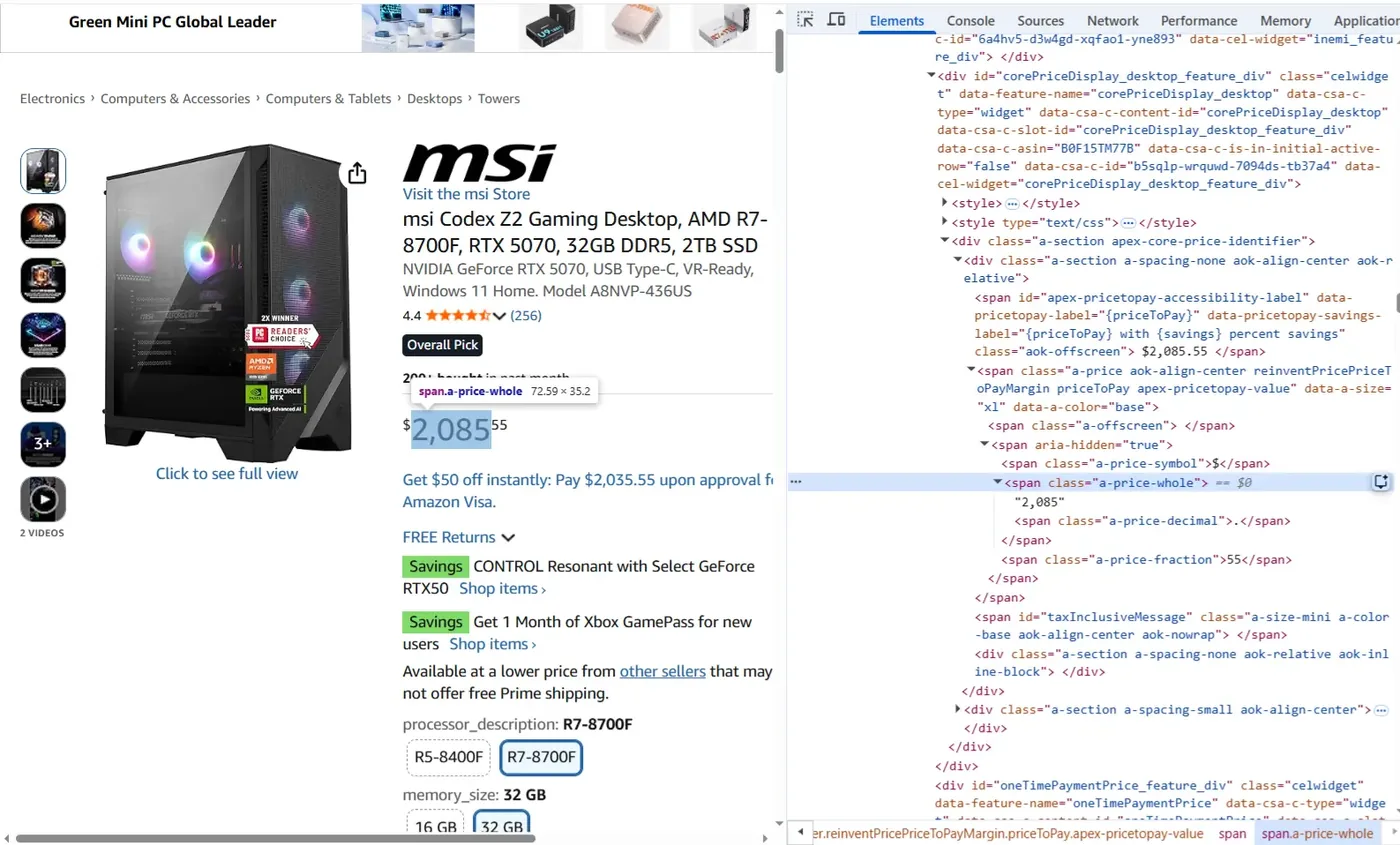
Because there is no API, every field is read straight from a named element in the page, and knowing the exact container is what makes a parse reliable. On a real Amazon listing these are the anchors that matter. The title sits in span#productTitle. The current price is split across span.a-price-whole and span.a-price-fraction inside the core price block, div#corePriceDisplay_desktop_feature_div, with a full formatted copy in a nested span.a-offscreen. The struck-through list price or MRP is a separate span.a-text-price inside that same block, and the discount is span.savingsPercentage, which on our example product read minus 5 percent against a 5,499 list price. Stock status is the text of div#availability, which read In stock. The star rating is the title attribute of span#acrPopover, or equivalently the span.a-icon-alt text, both reading 3.8 out of 5 stars, and the review count is span#acrCustomerReviewText, reading 751. The brand is the link text in a#bylineInfo. Who the item ships from and who sells it come from the buy box, the offer-display-feature-text-message spans, both reading Amazon on this listing. The bullet features are the li.a-list-item entries under div#feature-bullets, and the full-resolution images are the hiRes URLs held in the image block's JSON. The trap is that span.a-offscreen appears many times across the page, in recommendation strips and other modules, so anchoring to the core price block rather than the first price-looking node on the page is the difference between the real selling price and a random one.
Knowing the numbers are actually right
The dangerous failure on Amazon is not a scraper that crashes. It is a scraper that keeps returning a number that is quietly wrong. A single product page can show a struck-through list price, a clipped coupon that only applies at checkout, a Subscribe and Save rate, and a warehouse deal, and a naive parse grabs whichever value happens to sit in the price node that day. Amazon also varies price by region and by whether it thinks you are a returning shopper, so the same ASIN can read differently across two requests. Stock is just as slippery. "In Stock" from the featured seller, "Only 3 left", third party offers, and "Currently unavailable" all mean different things, and collapsing them into one true or false throws away the signal your team actually cares about. Validation is what separates a feed you can trust from a wall of noise. In practice that means storing the seller and buy box owner next to each price, flagging any price that jumps beyond a set percent between runs, confirming currency and unit match, and alerting when a field goes null across many products at once, which almost always means the layout moved rather than every product losing its price. Silent breakage is the normal state on this site, so we bake these checks in from day one and watch them, instead of handing you a number and hoping it holds.
The anti-bot reality on Amazon, and why feeds quietly rot
Amazon is one of the more aggressively defended public retail sites, and its defenses are built to degrade quietly rather than block loudly. A request that trips a threshold often returns a 200 response carrying a CAPTCHA page, a stripped down layout, or a stale cached price, so your code believes it succeeded while it saves garbage. Rate limits are shaped by region and by request pattern, not a simple hourly cap, and they tighten during peak shopping windows, exactly when accurate price data matters most. Layouts get A/B tested, so a selector that works for most products silently misses the rest. Personalization means the displayed price, and even the buy box winner, can shift based on inferred location and browsing history. Handling this well is mostly discipline, not one clever trick. It means spreading requests across regions and times, matching the natural rhythm of the site instead of hammering it, detecting soft blocks by validating the shape of what came back, and retrying with backoff rather than blindly. We do not sell proxies, and we never touch anything behind a login. We collect only public pages, the same ones a shopper sees. We have run pipelines through serious anti-bot on travel sites like Booking and Expedia, and across high volume public sources, so we know where feeds rot and how to keep one healthy for months. A scraper that works in a demo is easy. One that still works next quarter is the real job.
Step by step: pulling price and stock from a real listing
Here is the shape of it if you were doing it by hand. Open a product page, find where each field lives in the HTML, then read those fields with a few lines of Python. This uses a real listing, the Amazon Fire TV Stick HD (ASIN B0DVJF7528) on amazon.in, so the selectors below are the actual ones on the page, not stand-ins.
import requests
from bs4 import BeautifulSoup

url = "https://www.amazon.in/dp/B0DVJF7528"
headers = {"User-Agent": "Mozilla/5.0 (Windows NT 10.0; Win64; x64)"}

html = requests.get(url, headers=headers).text
soup = BeautifulSoup(html, "html.parser")

def text(sel, root=soup):
    el = root.select_one(sel)
    return el.get_text(strip=True) if el else None

# Anchor to the core price block so decoy prices elsewhere are ignored.
price_box = soup.select_one("#corePriceDisplay_desktop_feature_div")

title = text("#productTitle")
whole = text(".a-price-whole", price_box)
fraction = text(".a-price-fraction", price_box)
mrp = text(".a-text-price .a-offscreen", price_box)
discount = text(".savingsPercentage", price_box)
availability = text("#availability")
rating = text("#acrPopover .a-icon-alt")
reviews = text("#acrCustomerReviewText")
brand = text("#bylineInfo")

print(title, f"{whole}{fraction}", mrp, discount, availability, rating, reviews, brand)| Title | Amazon Fire TV Stick HD (newest model) |
|---|---|
| ASIN | B0DVJF7528 |
| Brand | Amazon |
| Price | ₹5,249.00 |
| List price (MRP) | ₹5,499.00 |
| Discount | 5% off |
| Availability | In stock |
| Rating | 3.8 out of 5 |
| Reviews | 751 |
| Ships from / Sold by | Amazon |
| Marketplace | amazon.in |
A sample of the clean data we deliver for one product.
That works on one product, from your own browser, once. Run it across thousands of products on a schedule and Amazon starts returning captchas, rotating the class names, serving a different layout, and blocking the requests, and the plain requests call above will often come back as a bot page instead of the listing. Handling that reliably, and keeping it working as the page changes, is the actual job, and it is the part we take off your plate. Send us your product list and we deliver a clean, maintained price and stock feed keyed on ASIN.
Fields worth capturing from Amazon
- ASIN
- Title
- Brand
- Current price
- List price (MRP)
- Discount percent
- Buy-box seller
- Ships from
- Stock status
- Star rating
- Review count
- Feature bullets
- Product images
- Category
Frequently asked questions
Related service: Competitor Price Monitoring
Want an Amazon feed without the build?
Send us the products or pages you need, and we will deliver a clean feed and maintain it. Start with a free sample.
Get a Free Sample